Pixel Art Fire Effects: 12 Free Procedural Sprites for Indie Games
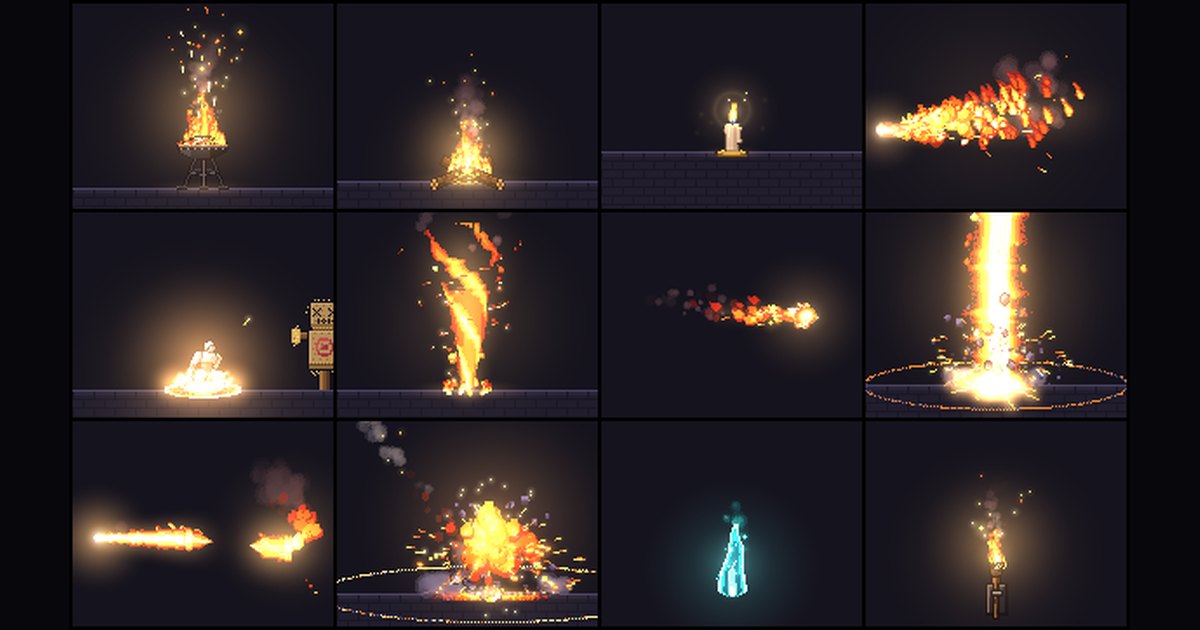
Fire is often the first visual effect an indie developer needs to implement. Whether setting up wall torches in a dungeon, building a rest-area campfire, or casting basic combat spells, flame dynamics anchor player immersion. Hand-drawing frame-by-frame pixel-art fire is notoriously slow to get right, requiring dozens of individual frames to capture rising heat, flickering silhouettes, and cooling smoke without jarring loop seams. PixelFX solves this with a dedicated set of 12 procedural fire effects, part of a larger open-source library of 244 procedural pixel-art effects in 21 categories at pixelfx.getpicforge.com. Because every animation is generated by code through deterministic simulations rather than hand-drawn drawings, each asset loops cleanly or resolves with natural timing. All 12 effects in the fire category are free for commercial use under the MIT license and export as transparent PNG sprite sheets with an Aseprite-compatible JSON atlas.
The 12 fire effects at a glance
| Effect | Type | Duration | Canvas | Best for |
|---|---|---|---|---|
| brazier | Loop | 3s | 112x148 | Courtyards, temple halls, heavy outdoor altars |
| campfire | Loop | 3s | 128x128 | Rest sites, wilderness camps, save points |
| candle | Loop | 4s | 56x76 | Desks, shrines, subtle interior illumination |
| torch | Loop | 2s | 72x120 | Dungeon hallways, castle walls, vertical supports |
| spirit-flame | Loop | 3s | 80x124 | Crypts, ethereal beacons, spectral checkpoints |
| fire-breath | Loop | 1.5s | 160x116 | Dragon attacks, continuous flame traps, boss channels |
| flamethrower | Loop | 1.6s | 184x104 | Sci-fi weapons, industrial hazards, mechanical units |
| fireball | Loop | 1.2s | 136x56 | Mage projectiles, ranged monster attacks, linear spells |
| fire-tornado | Loop | 2s | 120x152 | Area hazards, elemental summons, persistent vortexes |
| fire-ring | One-shot | 3.9s | 224x128 | Radial bursts, shockwaves, ground-clearing spells |
| flame-pillar | One-shot | 5s | 184x256 | Boss eruptions, volcanic traps, vertical zone strikes |
| meteor | One-shot | 5s | 272x232 | Ultimate spells, siege strikes, cinematic impacts |
Ambient loops: light and atmosphere
Brazier
The brazier features an iron bowl resting on a tripod heaped with glowing coals, crowned by a large roaring fire with sparks streaming upward. It runs on a seamless 3-second loop over a 112x148 canvas, making it suitable for castle halls, fortress gates, and temple plazas. The upward spark trail provides strong vertical movement in tall rooms.
Campfire
The campfire is assembled from crossed logs placed over glowing coals, producing lively leaping flames, smoke plumes, and a wide, warm pool of light. Sized at 128x128 across a 3-second cycle, it drops directly into forest clearings, survival save points, and rest areas. The built-in illumination and smoke layers reduce the need to compose separate lighting sprites.
Candle
The candle consists of a wax candle seated in a brass dish, burning with a calm flame that features a blue root and a soft halo of light. With a compact 56x76 footprint and a 4-second loop, it works on study desks, occult shrines, and quiet indoor scenes. The steady halo delivers ambient motion without distracting the player from nearby UI or dialogue.
Torch
The torch is a wall-mounted unit set in an iron bracket, showing licking flames and flickering light cast directly against the wall surface. It loops every 2 seconds within a 72x120 canvas, aligning neatly with modular corridor and dungeon wall tiles. The animated light throw on the backplate gives flat walls immediate depth.
Spirit-flame
The spirit-flame trades warm combustion for a cold blue-teal ghost fire that levitates freely in mid-air. Its 3-second loop on an 80x124 canvas displays a wispy trailing tail and drifting cold sparks. It is tailored for spectral dungeons, floating familiars, and necromantic shrines where warm red-orange lighting would break the mood.
Combat fire: breaths, jets and projectiles
Fire-breath
The fire-breath renders a roaring cone of fire streaming horizontally to the right across a 160x116 canvas. The plume begins white-hot at the source before expanding outward and cooling into deep reds and trailing smoke over a 1.5-second loop. It aligns cleanly with dragon mouth sockets, boss channeling animations, and directional wall traps.
Flamethrower
The flamethrower simulates a pressurized fuel jet anchored by a small blue pilot flame, punctuated by rhythmic pressure surges and burning drops falling from the stream. Spanning 184x104 on a 1.6-second loop, it delivers an industrial, liquid-fuel look suited for modern or sci-fi weaponry. The falling drops provide clear visual weight and ground-splatter cues.
Fireball
The fireball is a direct projectile flying horizontally to the right on a fast 1.2-second cycle. The asset measures 136x56, led by a white-hot churning head and trailing a long, torn tail that cools into dispersed smoke particles. Its low vertical profile fits common horizontal projectile hitboxes in side-scrollers and top-down action titles.
Fire-tornado
The fire-tornado forms a spinning funnel of fire built from spiraling bands and orbiting embers. Contained within a 120x152 canvas over a 2-second loop, it acts as an area-denial hazard or summonable vortex. The distinct rotational silhouette telegraphs its active threat zone clearly to players.
Big one-shots: pillars, meteors and rings
Flame-pillar
The flame-pillar is a 5-second one-shot eruption mapped to a tall 184x256 bounding box. The floor first cracks and glows, followed by a violent column of fire that erupts white-hot before collapsing into heavy rolling smoke. The extended wind-up and lingering smoke give players fair warning and clear resolution around boss attacks.
Meteor
The meteor delivers a high-impact 5-second sequence within a 272x232 canvas. A burning rock streaks downward and smashes into the floor, producing an initial flash, an expanding fireball, and a glowing crater that gradually cools down. Its massive canvas size makes it suited for ultimate magic spells, orbital bombardments, and scripted scene transitions.
Fire-ring
The fire-ring provides an expanding ground-level burst running for 3.9 seconds across 224x128 pixels. The animation starts with a white flash at the caster's feet, after which flames race outward along the floor in an expanding ring, leaving behind a smouldering scorch mark. This ground-hugging spread fits radial knockback abilities, boss phase changes, and radial defensive wards.
From preview to sprite sheet in four steps
- Open the effect in the gallery. Select any fire effect from the catalog to load its full animation inside the studio panel.
- Tune palette, seed, and backdrop in the studio. Switch between palette presets to fit your project's color grade, change the random seed to roll a variation (retaining the exact same seed keeps the animation deterministic), toggle horizontal flipping if direction matters, and test readability across dark dungeon, ground, sky, or light backdrops.
- Export the PNG sprite sheet and JSON. Click export to generate your assets directly inside your browser. The tool delivers a transparent PNG sprite sheet, a single-frame PNG, and an Aseprite-compatible JSON atlas containing frame coordinates, frame rates, loop tags, pivot or anchor points, and hit timing metadata.
- Import into your engine.
- In Godot, import the sprite sheet texture and use the frame data to populate an AnimatedSprite2D or SpriteFrames resource.
- In Unity, slice the imported PNG by grid or frame dimensions in the sprite editor and construct an animation clip from the resulting frames.
- In Phaser, load the PNG and JSON atlas pair via the loader and define animations using the generated frame keys and tags.
The exported sheets also drop directly into PixiJS, GameMaker, and custom HTML5 Canvas rendering loops without format conversion.
Loops vs one-shots: which do you need?
Selecting the right animation type depends on whether the fire represents persistent scene lighting or an instantaneous gameplay event:
- Looping effects (9 of 12): Torches, campfires, braziers, and lingering hazard tiles need continuous animations. These loops run indefinitely without visible seam cuts between the final and initial frames, maintaining ambient motion on static props and ongoing status burns.
- One-shot effects (3 of 12): Spell casts, bursts, and sudden impacts require single playback cycles. In this fire collection,
flame-pillar,meteor, andfire-ringare dedicated one-shots designed to trigger on an action, execute their hit frames, and despawn or transition.
A practical approach in combat systems is layering both: spawn a one-shot meteor or flame-pillar on impact, then immediately place a looping ground flame on the same coordinates to represent burning terrain after the strike resolves.
FAQ
Are these fire effects really free for commercial games?
Yes. The library code is released under the MIT license, permitting free use in commercial releases, open-source projects, and game jams without royalties.
Can I recolor an effect to match my game's palette?
Yes. The studio panel provides built-in palette presets to adapt flames to soul fire, poison burns, or alien energy, while seed adjustments change particle shapes deterministically without altering the underlying frame rate.
Do I need Aseprite to use the exports?
No. The primary export is a standard transparent PNG sprite sheet usable in any game engine or graphics pipeline. The accompanying JSON file follows Aseprite-compatible atlas conventions, making it easy to parse frame bounding boxes and timing tags, but third-party software is not required.
Explore the full set of procedural animations in the fire category. Beyond fire, the PixelFX gallery hosts 244 effects across 21 categories, including explosions, ice, lightning, and water, each ready to preview live, customize, and export directly in your browser.